A contact list is a collection of email addresses grouped under a single name. It allows you to easily send messages or meeting invitations to multiple people simultaneously, without having to enter each address individually:
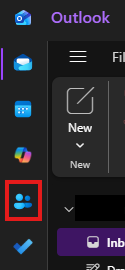
- Launch the new Outlook and click the People icon in the navigation bar on the left.
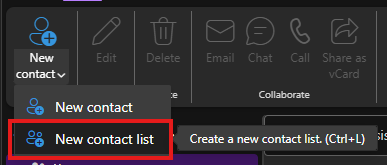
Click the small arrow to the right of the "New contact" button and select New contact list.
Enter a name for your list.
Add the desired contacts in the Add members field.
Click Create.
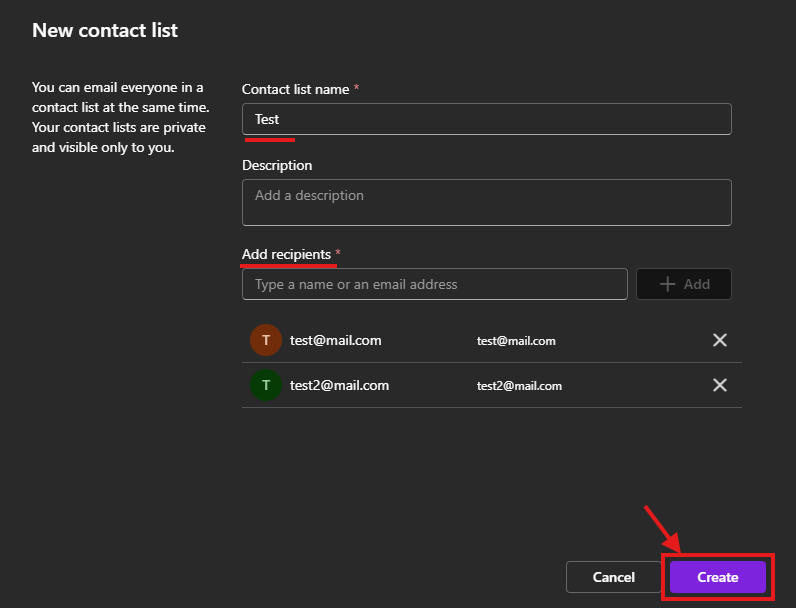
You can send an email to all members of a contact list at the same time. Your contact lists are private and are only visible to you.
Cet article a-t-il été utile ?
C'est super !
Merci pour votre commentaire
Désolé ! Nous n'avons pas pu vous être utile
Merci pour votre commentaire
Commentaires envoyés
Nous apprécions vos efforts et nous allons corriger l'article