If you use multiple Microsoft accounts on the same device, such as your Human & Work account and a TELUS Health account, a single browser can mix sessions.
This can cause login errors, opening the wrong account, or being unable to access certain links.
Our recommended solution: two browsers

The simplest and most reliable way to separate your accounts is to use two different browsers.
Example:
Google Chrome : Human & Work account
Firefox : TELUS Health account
Advantages:
Completely separate sessions and cookies
Reduced access errors
Keep in mind that if you click a link it will open in your default browser which, unless you changed anything, is configured with your historical H&W account.
When you receive a TELUS Health link, always open it in the browser dedicated to that account to avoid any confusion (by copying and pasting the link).
Alternative: one browser with multiple profiles (Microsoft Edge)
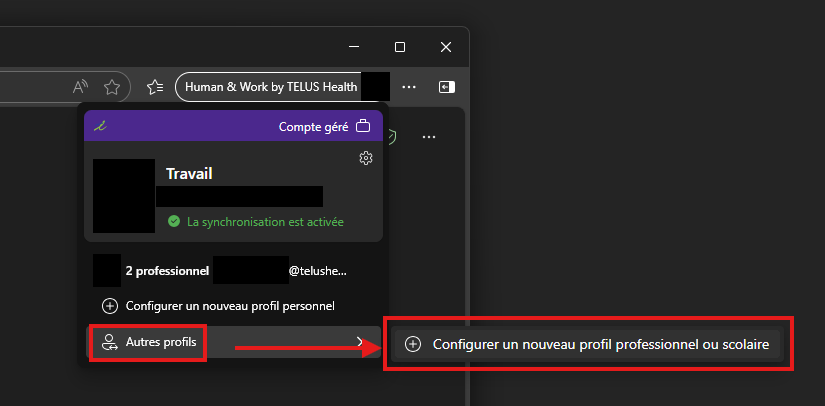
If you prefer to use a single browser, you can create a profile for each account.
Example:
Professional profile 1: Human & Work
Professional profile 2: TELUS Health
Each profile keeps its logins, cookies, and settings independently, allowing you to switch between multiple accounts without interference.
Cet article a-t-il été utile ?
C'est super !
Merci pour votre commentaire
Désolé ! Nous n'avons pas pu vous être utile
Merci pour votre commentaire
Commentaires envoyés
Nous apprécions vos efforts et nous allons corriger l'article